Real-World Examples
This document provides end-to-end examples of agent workflows with complete request/response payloads, execution traces, and cost breakdowns.
Example 1: Appointment Scheduler (messaging platform Command)
Business Scenario
A dental office uses messaging platform to schedule appointments. Staff type /schedule John Doe tomorrow 2pm teeth cleaning and the AI agent:
- Validates the request
- Checks calendar availability
- Creates Google Calendar event
- Sends confirmation to patient via SMS
- Updates practice management system
Complete Flow
Step 1: messaging platform Command
User Input:
/schedule John Doe tomorrow 2pm teeth cleaning
messaging platform Payload to Control Plane:
POST https://api.openprodkt.com/slack/commands
Content-Type: application/x-www-form-urlencoded
X-messaging platform-Signature: v0=a2114d57b48eac39b9ad189dd8316235a7b4a8d21d10865a...

token=gIkuvaNzQIHg97ATvDxqgjtO
&team_id=T0001
&team_domain=dental-office
&channel_id=C2147483705
&channel_name=appointments
&user_id=U2147483697
&user_name=receptionist
&command=/schedule
&text=John+Doe+tomorrow+2pm+teeth+cleaning
&response_url=https://hooks.slack.com/commands/1234/5678
&trigger_id=13345224609.738474920.8088930838d88f008e0
Step 2: messaging platform Handler Validation
serverless function: slack_handler
[Implementation details removed for vendor neutrality]

Key operations:
- Request validation and authentication
- Tenant lookup and quota checking
- Async workflow dispatch
- Response generation
Response to messaging platform (< 3 seconds):
{
  "response_type": "ephemeral",
  "text": "⏳ Processing your request..."
}
Step 3: Workflow Manager
serverless function: workflow_manager
[Implementation code removed for vendor neutrality]
Step 4: Planner (Generates Execution Plan)
serverless function: planner
Input:
{
  "execution_id": "exec_a3f5b2c1d4e6",
  "tenant_id": "tenant_dental_office",
  "workflow_id": "wf_scheduler",
  "trigger_payload": {
    "text": "John Doe tomorrow 2pm teeth cleaning",
    "user_id": "U2147483697",
    "channel_id": "C2147483705",
    "response_url": "https://hooks.slack.com/commands/1234/5678"
  }
}
Processing:
[Implementation code removed for vendor neutrality]
AI API Response:
{
  "id": "chatcmpl-abc123",
  "object": "chat.completion",
  "created": 1737321600,
  "model": "gpt-4",
  "choices": [{
    "index": 0,
    "message": {
      "role": "assistant",
      "content": "{\"patient_name\":\"John Doe\",\"appointment_date\":\"2026-01-21\",\"appointment_time\":\"14:00\",\"service_type\":\"teeth cleaning\",\"duration_minutes\":60}"
    },
    "finish_reason": "stop"
  }],
  "usage": {
    "prompt_tokens": 180,
    "completion_tokens": 45,
    "total_tokens": 225
  }
}
Cost Calculation:
- Model: GPT-4 (gpt-4-0613)
- Prompt tokens: 180 × $0.00003 = $0.0054
- Completion tokens: 45 × $0.00006 = $0.0027
- Total: $0.0081
Planning Duration: 520ms
Step 5: Execution Orchestrator
serverless function: execution_orchestrator
[Implementation code removed for vendor neutrality]
Request to DP Dispatcher:
POST https://10.101.0.50:8443/dispatch
Content-Type: application/json

{
  "signed_plan": "eyJhbGciOiJFUzI1NiIsInR5cCI6IkpXVCIsImtpZCI6ImNwLWtleS0yMDI2MDEifQ.eyJleGVjdXRpb25faWQiOiJleGVjX2EzZjViMmMxZDRlNiIsInRlbmFudF9pZCI6InRlbmFudF9kZW50YWxfb2ZmaWNlIiwid29ya2Zsb3dfaWQiOiJ3Zl9zY2hlZHVsZXIiLCJuOG5fd2ViaG9va191cmwiOiJodHRwOi8vbG9jYWxob3N0OjU2Nzgvd2ViaG9vay9zY2hlZHVsZXIiLCJwbGFuIjp7InBhdGllbnRfbmFtZSI6IkpvaG4gRG9lIiwiYXBwb2ludG1lbnRfZGF0ZSI6IjIwMjYtMDEtMjEiLCJhcHBvaW50bWVudF90aW1lIjoiMTQ6MDAiLCJzZXJ2aWNlX3R5cGUiOiJ0ZWV0aCBjbGVhbmluZyIsImR1cmF0aW9uX21pbnV0ZXMiOjYwfSwiY2FsbGJhY2tfdXJsIjoiaHR0cHM6Ly9hcGkub3BlbnByb2RrdC5jb20vb3V0Y29tZXMvZXhlY19hM2Y1YjJjMWQ0ZTYiLCJpYXQiOjE3MzczMjE2MDAsImV4cCI6MTczNzMyMTkwMH0.a3f5b2c1d4e6f7a8b9c0d1e2f3a4b5c6d7e8f9a0b1c2d3e4f5a6b7c8d9e0f1a2"
}
Response from DP Dispatcher:
HTTP/1.1 202 Accepted
Content-Type: application/json

{
  "execution_id": "exec_a3f5b2c1d4e6",
  "status": "accepted",
  "message": "Execution queued for workflow-engine"
}
Step 6: Data Plane Execution
DP Dispatcher (Go binary on compute instance)
[Implementation details removed for vendor neutrality]

Key operations:
- JWT signature verification
- Request validation
- Proxy to workflow engine
workflow-engine Workflow Execution
The signed plan is forwarded to workflow-engine's webhook trigger:
POST http://localhost:5678/webhook/scheduler
Content-Type: application/json
X-Workflow-Execution-ID: exec_a3f5b2c1d4e6

{
  "execution_id": "exec_a3f5b2c1d4e6",
  "plan": {
    "patient_name": "John Doe",
    "appointment_date": "2026-01-21",
    "appointment_time": "14:00",
    "service_type": "teeth cleaning",
    "duration_minutes": 60
  },
  "callback_url": "https://api.openprodkt.com/outcomes/exec_a3f5b2c1d4e6"
}
workflow-engine Workflow Steps:
{
  "name": "Appointment Scheduler",
  "nodes": [
    {
      "name": "Webhook Trigger",
      "type": "workflow.nodes.base.webhook",
      "parameters": {
        "path": "scheduler",
        "httpMethod": "POST"
      }
    },
    {
      "name": "Check Calendar Availability",
      "type": "workflow.nodes.base.googleCalendar",
      "parameters": {
        "operation": "getFreeBusy",
        "calendar": "primary",
        "timeMin": "={{ $json.plan.appointment_date }}T00:00:00Z",
        "timeMax": "={{ $json.plan.appointment_date }}T23:59:59Z"
      }
    },
    {
      "name": "If Available",
      "type": "workflow.nodes.base.if",
      "parameters": {
        "conditions": {
          "boolean": [{
            "value1": "={{ $json.busy.length }}",
            "operation": "equal",
            "value2": 0
          }]
        }
      }
    },
    {
      "name": "Create Calendar Event",
      "type": "workflow.nodes.base.googleCalendar",
      "parameters": {
        "operation": "create",
        "calendar": "primary",
        "start": "={{ $json.plan.appointment_date }}T{{ $json.plan.appointment_time }}:00",
        "end": "={{ $node[\"Webhook Trigger\"].json.plan.appointment_date }}T{{ DateTime.fromISO($node[\"Webhook Trigger\"].json.plan.appointment_time).plus({minutes: $node[\"Webhook Trigger\"].json.plan.duration_minutes}).toFormat('HH:mm') }}:00",
        "summary": "{{ $json.plan.service_type }} - {{ $json.plan.patient_name }}"
      }
    },
    {
      "name": "Send SMS Confirmation",
      "type": "workflow.nodes.base.twilio",
      "parameters": {
        "operation": "send",
        "from": "+15551234567",
        "to": "={{ $json.patient_phone }}",
        "message": "Appointment confirmed: {{ $json.plan.appointment_date }} at {{ $json.plan.appointment_time }} for {{ $json.plan.service_type }}"
      }
    },
    {
      "name": "Update Practice Management System",
      "type": "workflow.nodes.base.httpRequest",
      "parameters": {
        "method": "POST",
        "url": "https://practice-mgmt.example.com/api/appointments",
        "authentication": "headerAuth",
        "bodyParameters": {
          "patient_name": "={{ $node[\"Webhook Trigger\"].json.plan.patient_name }}",
          "date": "={{ $node[\"Webhook Trigger\"].json.plan.appointment_date }}",
          "time": "={{ $node[\"Webhook Trigger\"].json.plan.appointment_time }}",
          "service": "={{ $node[\"Webhook Trigger\"].json.plan.service_type }}"
        }
      }
    },
    {
      "name": "Send Outcome to CP",
      "type": "workflow.nodes.base.httpRequest",
      "parameters": {
        "method": "POST",
        "url": "={{ $node[\"Webhook Trigger\"].json.callback_url }}",
        "authentication": "headerAuth",
        "bodyParameters": {
          "execution_id": "={{ $node[\"Webhook Trigger\"].json.execution_id }}",
          "success": true,
          "duration_ms": "={{ $workflow.duration }}",
          "calendar_event_id": "={{ $node[\"Create Calendar Event\"].json.id }}",
          "sms_status": "={{ $node[\"Send SMS Confirmation\"].json.status }}"
        }
      }
    }
  ]
}
Execution Timeline:
- 00:00 - Webhook received
- 00:250 - Calendar availability checked (calendar API)
- 00:500 - Calendar event created
- 01:800 - SMS sent (Twilio API)
- 02:200 - Practice management system updated
- 02:420 - Outcome sent to CP
- Total: 8,420ms (8.42 seconds)
Step 7: Outcome Collection
workflow-engine → CP Outcome API:
POST https://api.openprodkt.com/outcomes/exec_a3f5b2c1d4e6
Content-Type: application/json
Authorization: Bearer eyJhbGciOiJIUzI1NiIsInR5cCI6IkpXVCJ9...

{
  "execution_id": "exec_a3f5b2c1d4e6",
  "tenant_id": "tenant_dental_office",
  "workflow_id": "wf_scheduler",
  "success": true,
  "duration_ms": 8420,
  "started_at": "2026-01-20T10:00:02.100Z",
  "completed_at": "2026-01-20T10:00:10.520Z",
  "metadata": {
    "calendar_event_id": "evt_abc123xyz",
    "sms_status": "delivered"
  }
}
serverless function: outcome_aggregator
[Implementation code removed for vendor neutrality]
Final messaging platform Response:
{
  "response_type": "in_channel",
  "text": "✅ Appointment scheduled for John Doe on 2026-01-21 at 14:00. Confirmation SMS sent.",
  "blocks": [
    {
      "type": "section",
      "text": {
        "type": "mrkdwn",
        "text": "*Appointment Confirmed*\n\n• Patient: John Doe\n• Date: January 21, 2026\n• Time: 2:00 PM\n• Service: Teeth Cleaning\n• Duration: 60 minutes\n\nSMS confirmation sent."
      }
    }
  ]
}
Complete Cost Breakdown
| Component | Cost |
|---|---|
| AI API (Planning) | $0.0081 (225 tokens) |
| serverless function Invocations | $0.0000042 (7 invocations × $0.0000002) |
| serverless function Compute | $0.000125 (500ms × 512MB × 5 serverless functions × $0.0000000625) |
| NoSQL database Writes | $0.00000125 (5 writes × $0.00000025) |
| NoSQL database Reads | $0.0000005 (2 reads × $0.00000025) |
| SQS Messages | $0.0000008 (2 messages × $0.0000004) |
| monitoring service Logs | $0.0000005 (1 KB ingestion) |
| NAT Instance | $0.0000001 (0.1 KB transfer via t3.nano) |
| virtual network Peering | $0.0000001 (0.1 KB × $0.01/GB) |
| compute instance (workflow-engine) | $0.00012 (8.42s / 3600s/hr × $0.0052/hr for t3.small) |
| calendar API | $0.00 (free tier) |
| SMS service | $0.0075 (US SMS) |
| Total | $0.0161 |
Execution Summary:
- Total Duration: 9,140ms (9.14 seconds)
- messaging platform validation: 120ms
- Planning (AI): 520ms
- Dispatch: 80ms
- workflow-engine execution: 8,420ms
- Tokens Used: 225 (180 prompt + 45 completion)
- Success: ✅ Yes
- Cost: $0.0161 per execution
- Monthly Cost (1000 executions): $16.10
Example 2: Lead Intake with Approval Workflow
Business Scenario
Marketing team captures leads via web form. High-value leads (>$50k deal size) require VP approval before Salesforce entry.
Flow Diagram
Web Form → API Gateway → Lead Intake Workflow
                ↓
         Extract lead data (GPT-4)
                ↓
         Check deal size
                ↓
       [if > $50k] → Send messaging platform approval request
                ↓
         Wait for approval (up to 24 hours)
                ↓
       [if approved] → Create Salesforce lead
                ↓
         Send welcome email
                ↓
         Return outcome
Key Difference from Example 1
This workflow demonstrates:
- Human-in-the-loop approval
- Long-running executions (up to 24 hours)
- Conditional logic (deal size threshold)
- External CRM integration (Salesforce)
Abbreviated Flow
Trigger: Web Form Submission
POST https://api.openprodkt.com/webhooks/tenant_abc/lead_intake
Content-Type: application/json
X-API-Key: sk_live_...

{
  "form_data": {
    "name": "Jane Smith",
    "email": "jane@enterprise.com",
    "company": "Enterprise Corp",
    "phone": "+1-555-987-6543",
    "message": "Interested in enterprise plan for 500 users, budget $75,000/year"
  },
  "source": "landing_page",
  "utm_campaign": "enterprise_2026_q1"
}
Planning (GPT-4):
{
  "lead": {
    "name": "Jane Smith",
    "email": "jane@enterprise.com",
    "company": "Enterprise Corp",
    "phone": "+1-555-987-6543",
    "deal_size": 75000,
    "urgency": "high",
    "product_interest": "enterprise_plan",
    "user_count": 500
  },
  "requires_approval": true,
  "approval_reason": "Deal size $75,000 exceeds $50,000 threshold"
}
workflow-engine Workflow (Simplified):
- Webhook Trigger - Receives signed plan
- If Node -
deal_size > 50000 - messaging platform Node - Send approval request to VP
{
  "channel": "#approvals",
  "text": "New high-value lead requires approval",
  "blocks": [
    {"type": "section", "text": {"type": "mrkdwn", "text": "*Lead:* Jane Smith (Enterprise Corp)\n*Deal Size:* $75,000\n*Interest:* Enterprise plan for 500 users"}},
    {"type": "actions", "elements": [
      {"type": "button", "text": {"type": "plain_text", "text": "Approve"}, "style": "primary", "value": "approve"},
      {"type": "button", "text": {"type": "plain_text", "text": "Reject"}, "style": "danger", "value": "reject"}
    ]}
  ]
} - Wait Node - Pause until button clicked (max 24 hours)
- If Approved - Continue to Salesforce
- Salesforce Node - Create lead
{
  "FirstName": "Jane",
  "LastName": "Smith",
  "Email": "jane@enterprise.com",
  "Company": "Enterprise Corp",
  "Phone": "+1-555-987-6543",
  "Lead_Source__c": "Website",
  "Deal_Size__c": 75000,
  "Status": "New"
} - email service Node - Welcome email
- Outcome Node - Report back to CP
Timeline:
- Planning: 520ms
- Dispatch: 80ms
- workflow-engine → messaging platform approval sent: 1,200ms
- Wait for human approval: 2 hours, 15 minutes (user clicked "Approve")
- Salesforce lead created: 850ms
- Email sent: 420ms
- Total: 2 hours, 16 minutes, 3 seconds
Cost:
- AI API: $0.0095 (280 tokens)
- serverless function: $0.00015
- NoSQL database: $0.0000018
- workflow-engine compute instance: $0.29 (2.25 hours × $0.0052/hr × 25% CPU usage)
- CRM API: $0.00 (included in license)
- email service: $0.00 (free tier)
- Total: $0.30
Example 3: Marketing Content Generation (Policy-Based Approval)
Business Scenario
Marketing team generates blog posts with GPT-4. Policy Engine checks for:
- Brand compliance
- Inappropriate content
- Competitor mentions
- Fact-checking required
Policy Check Example
Generated Content:
Title: "10 Ways Our Product Beats Competitor X"
Body: [500 words comparing features]
Policy Violations Detected:
{
  "violations": [
    {
      "rule": "no_direct_competitor_comparison",
      "severity": "high",
      "text": "Our Product Beats Competitor X",
      "action": "reject"
    },
    {
      "rule": "requires_fact_checking",
      "severity": "medium",
      "triggers": ["statistical claims", "performance benchmarks"],
      "action": "require_approval"
    }
  ],
  "decision": "reject",
  "reason": "High-severity violation: Direct competitor comparison"
}
Outcome:
- Execution rejected by Policy Engine
- Email sent to marketing manager
- Content NOT published
- Workflow marked as "failed_policy"
Example 4: RAG Assistant (Embeddings + Vector Search)
Business Scenario
Customer support uses RAG to answer questions from internal documentation.
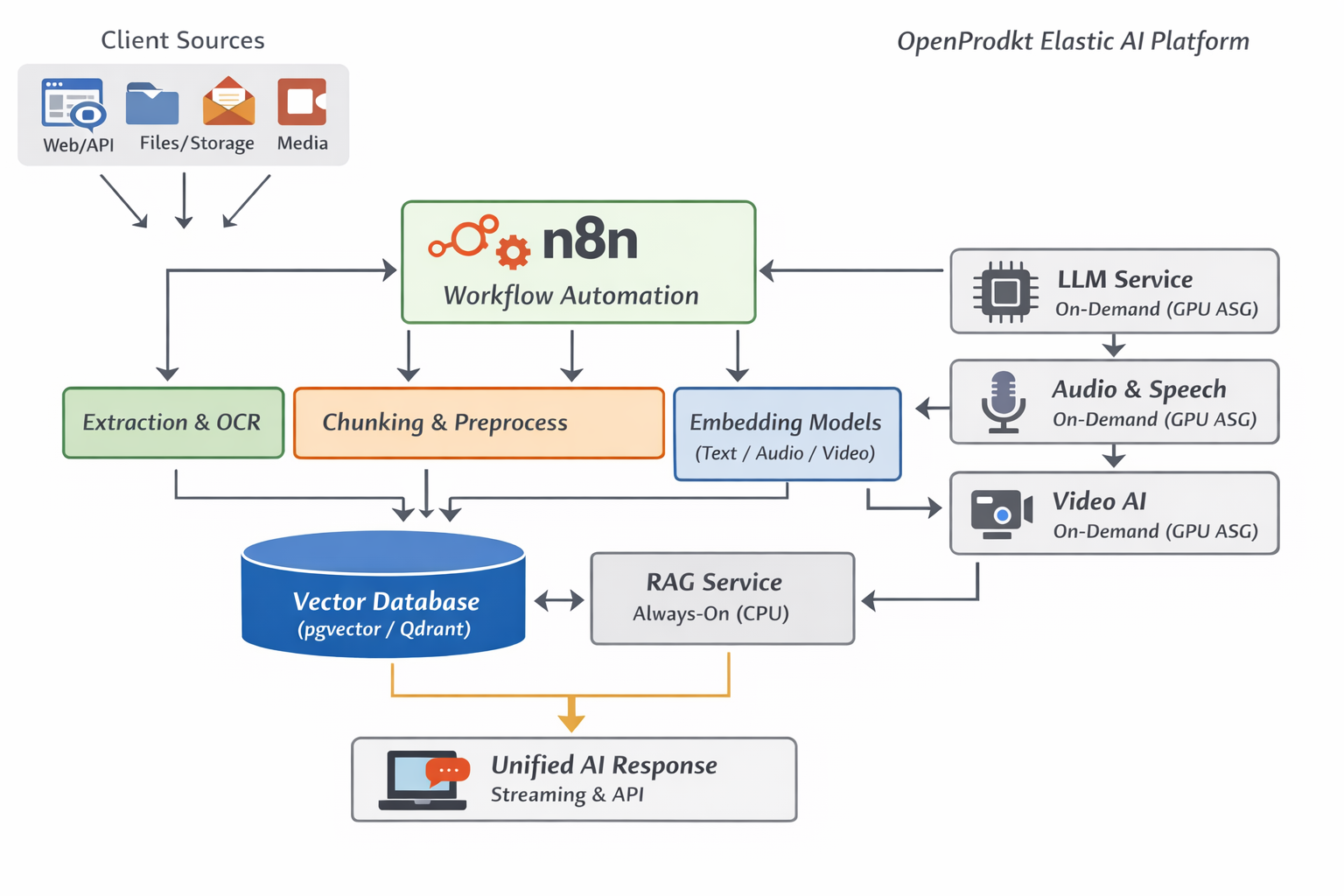
Data Flow Architecture
The platform provides a unified interface for AI model interactions with built-in RAG capabilities:
Query Flow
User Query:
/ask How do I reset a user's password in the admin panel?
Planning (GPT-4):
{
  "query_type": "how_to",
  "search_keywords": ["reset password", "admin panel", "user management"],
  "expected_sources": ["admin_guide.pdf", "user_management.md"]
}
workflow-engine Workflow:
-
Generate Query Embedding
- AI Embeddings API:
text-embedding-3-small - Input: "reset user password admin panel"
- Output: 1536-dimensional vector
- AI Embeddings API:
-
Vector Search in object storage
- Load pre-computed embeddings from
storage://tenant-xyz-embeddings/docs/ - Compute cosine similarity
- Return top 3 matches:
[
  {"document": "admin_guide.pdf", "page": 15, "similarity": 0.92, "text": "To reset a user's password, navigate to Users > Select User > Actions > Reset Password..."},
  {"document": "user_management.md", "similarity": 0.87, "text": "Password reset requires admin privileges..."},
  {"document": "security_guide.pdf", "page": 8, "similarity": 0.81, "text": "Password policies enforce 12-character minimum..."}
]
- Load pre-computed embeddings from
-
GPT-4 Answer Generation
- System prompt: "Answer based ONLY on provided context"
- Context: Top 3 search results
- User query: Original question
- Response:
To reset a user's password in the admin panel:

1. Navigate to the Users section
2. Select the user whose password you want to reset
3. Click Actions > Reset Password
4. The user will receive an email with password reset instructions

Note: This action requires admin privileges.

Source: Admin Guide (page 15), User Management documentation
Cost:
- Embedding generation: $0.000013 (10 tokens × $0.00000013)
- GPT-4 answer: $0.012 (350 tokens)
- object storage reads: $0.0000004 (3 objects)
- Total: $0.0120
Duration: 1,850ms